Examples
Example 1: String Matching with Grammatical Evolution on Jupyter Notebook
Starter Project
To run this example, create a new finchGE project:
Then find the notebook (basic.ipynb) in my_experiment/notebooks folder.
This example demonstrates how to use finchGE interactively to solve a simple but illustrative problem: string matching using Grammatical Evolution.
The goal is to evolve a string that exactly matches a given target string by defining:
- a grammar that generates candidate strings,
- a fitness function that measures similarity to the target,
- and a genetic algorithm that drives evolution.
Although the problem itself is simple, it showcases the Grammatical Evolution pipeline and illustrates how finchGE components can be composed programmatically.
Problem Description
Given a target string (e.g. "finch"), the objective is to evolve a candidate string such that:
- characters match the target at corresponding positions,
- string length is taken into account,
- fitness is minimized when the match is exact.
This is a classical introductory problem for Grammatical Evolution because:
- the grammar defines a structured search space,
- the genotype-phenotype mapping is explicit,
- fitness is easy to interpret and debug.
Random Seed
In finchGE, same RNG is shared across modules to ensure reproducibility.
Grammar Definition
The grammar defines the space of valid strings that evolution can explore.
from finchge.grammar import Grammar

grammar_str = """
<string> ::= <letter> | <letter> <string>
<letter> ::= _ | [a-z]
"""

grammar = Grammar(grammar_str)
describe function.
The output of describe as shown below:
Grammar:
<letter> ::= _ | a | b | c | d | e | f | g | h | i | j | k | l | m | n | o | p | q | r | s | t | u | v | w | x | y | z
| Description | Value |
|---|---|
| Number of Rules | 2 |
| Start Rule | <string> |
| Number of Terminals | 27 |
| Number of Non-Terminals | 2 |
| Max Arity | 2 |
| Can Terminate | True |
| Start Min Depth | 2 |
| Start Max Depth | Inf |
| Recursive Rules | 1 |
Configuring Genetic Operators
finchGE exposes genetic operators as independent components. Here we explicitly configure selection, crossover, mutation, and replacement.
from finchge.operators.selection import RouletteWheelSelection
from finchge.operators.crossover import OnePointCrossover
from finchge.operators.mutation import IntFlipMutation
from finchge.operators.replacement import GenerationalReplacement


selection = RouletteWheelSelection(max_best=False)
crossover = OnePointCrossover(codon_size=127, crossover_proba=0.5)
mutation = IntFlipMutation(mutation_probability=0.01, codon_size=127)
replacement = GenerationalReplacement(max_best=False)
Defining the Fitness Function
We use StringMatchFitness defined available in finchGE for this example.
The fitness value represents the number of mismatched characters plus any length difference.
Lower fitness values are better, with zero indicating a perfect match.
from finchge.fitness import StringMatchFitness

stringmatch_fitness  = StringMatchFitness(target="hello")
FinchGE includes some common fitness functions. For specific experiments,
a custom fitness function can be created by subclassing GEFitnessFunction class.
Setting up FitnessEvaluator
Fitness Evaluator handles the fitness evaluation
from finchge.grammar.mapper import GenotypeMapper
from finchge.fitness import FitnessEvaluator

# Initialize mapper for fitness evaluator
mapper = GenotypeMapper(grammar=grammar,
                            max_wraps=6,
                            max_recursion_depth=20)
# Initialize Fitness Evaluator
fitness_evaluator = FitnessEvaluator(
    fitness_functions=stringmatch_fitness,
    mapper=mapper
)
Constructing the Genetic Algorithm
The genetic algorithm is assembled by composing the operators.
from finchge.algorithm import GeneticAlgorithm

ga = GeneticAlgorithm(
    selection=selection,
    crossover=crossover,
    mutation=mutation,
    replacement=replacement,
    elite_size=3,
    fitness_evaluator=fitness_evaluator,
    random_state=RANDOM_SEED
)
Population Initialisation and Evaluation
We now create an initial population and evaluate it.
from finchge.initialisation import RandomGenomeInitialiser
from finchge.core.population import Population


initializer = RandomGenomeInitialiser(genome_length=100, codon_size=127)
population = Population(initialiser=initializer, population_size=100)
Running Evolution Interactively
We evolve the population manually generation by generation.
from tqdm import tqdm
fitness_history = []
fitness_evaluator.evaluate_population(population)

for generation in tqdm(range(100)):
    population = ga.evolve_one_generation(population)
    best = ga.get_best_individual(population)
    fitness_history.append(best)
100%|███████████████████████████████████| 100/100
This explicit loop allows full control over the evolutionary process and makes it easy to inspect intermediate results or modify parameters dynamically.
Inspecting the Best Individual
After evolution completes, we can inspect the best individual found in the final generation.
The best individual is displayed as below.
Individual:
| Attribute | Value |
|---|---|
| Phenotype | hello |
| Genotype | [107 35 83 5 47 93 47 93 30 69 82 93 52 69 47 93 49 69 31 51 23 47 92 114 39 39 15 28 96 56 102 83 109 102 123 24 0 89 6 29 60 6 85 109 31 53 16 99 124 59 27 106 82 101 14 57 49 9 101 118 120 83 96 23 112 32 66 88 98 76 80 34 5 127 123 71 35 62 96 33 80 93 41 46 25 41 72 20 16 93 110 63 104 112 107 98 6 2 51 126 6 28 44 82 9 30 111 11 31 25 62 82 14 13] |
| Used Codons | 10 |
| Fitness | [0] |
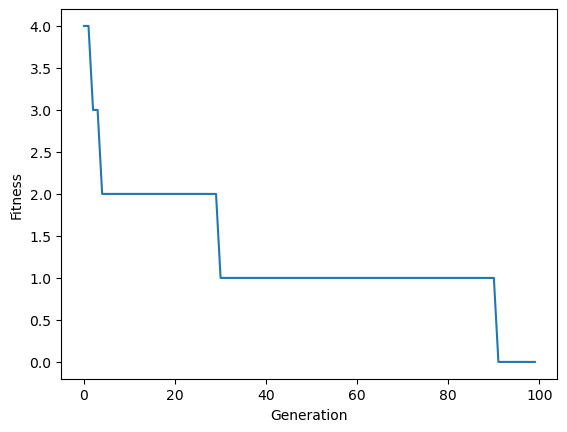
Visualizing Fitness Progress
Fitness progression across generations can be visualized to analyze convergence behavior.
import pandas as pd
import matplotlib.pyplot as plt
import seaborn as sns

df = pd.DataFrame({
    "Generation": range(len(fitness_history)),
    "Fitness": [ind.fitness[0] for ind in fitness_history]
})

sns.lineplot(data=df, x="Generation", y="Fitness")
plt.show()
Summary
This example demonstrates how finchGE can be used interactively to solve a simple string matching problem using Grammatical Evolution.
This example includes:
- explicit grammar-based genotype-phenotype mapping,
- problem-specific fitness definition,
- modular composition of genetic operators,
- generation-level control over evolution,
- programmatic inspection and analysis of results.
Although the string matching problem is simple, the same workflow applies directly to more complex Grammatical Evolution tasks such as symbolic regression, program synthesis, and structured optimization problems.
More Examples
More examples are available on github repository finchGE/finchge-examples